Metadata CLI

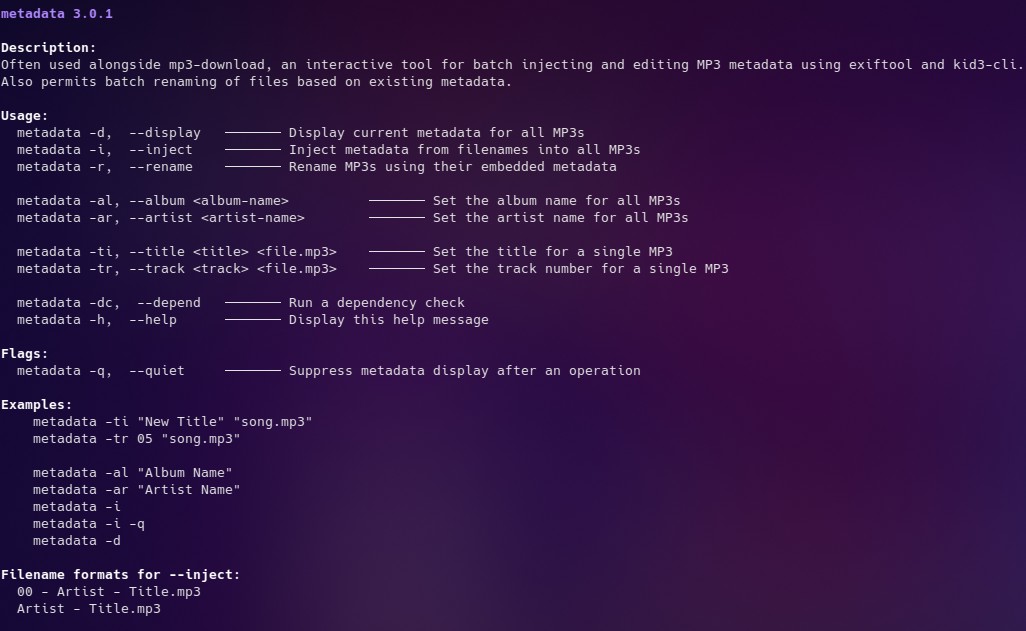
Description:
Often used alongside mp3-download, an interactive tool for batch injecting and editing MP3 metadata using exiftool and kid3-cli.
Also permits batch renaming of files based on existing metadata.

Usage:
 metadata -d,  –display   ─────── Display current metadata for all MP3s
 metadata -i,  –inject    ─────── Inject metadata from filenames into all MP3s
 metadata -r,  –rename    ─────── Rename MP3s using their embedded metadata

 metadata -al, –album <album-name>          ─────── Set the album name for all MP3s
 metadata -ar, –artist <artist-name>        ─────── Set the artist name for all MP3s

 metadata -ti, –title <title> <file.mp3>    ─────── Set the title for a single MP3
 metadata -tr, –track <track> <file.mp3>    ─────── Set the track number for a single MP3

 metadata -dc,  –depend   ─────── Run a dependency check
 metadata -h,  –help      ─────── Display this help message

Flags:
 metadata -q,  –quiet     ─────── Suppress metadata display after an operation

Examples:
   metadata -ti “New Title” “song.mp3”
   metadata -tr 05 “song.mp3”

   metadata -al “Album Name”
   metadata -ar “Artist Name”
   metadata -i
   metadata -i -q
   metadata -d

Filename formats for –inject:
 00 – Artist – Title.mp3
 Artist – Title.mp3

Download metadata.sh

#!/bin/bash
#
#
# Dependencies:
#   exiftool
#     sudo apt install exiftool
#
#     sudo apt install kid3-cli
#
set -e

# Set Version
VERSION="metadata 3.0.2"

####################
# COLOUR VARIABLES
####################

# Terminal Formatting
RESET="\033[0m"
BOLD="\033[1m"

# UI Colours
CLR_RED="\033[38;5;196m"  # Bright Red
CLR_GREEN="\033[38;5;46m" # Bright Lime Green

CLR_GOLD="\033[38;5;226m"         # Gold
CLR_PURPLE="\033[38;5;141m"       # Light Purple / Lavender
CLR_LABEL="\033[38;5;81m"         # Bright Sky Blue
CLR_LABEL2="\033[38;5;2m"         # Dark Forest Green
CLR_PROMPT="${BOLD}\033[38;5;51m" # Aqua + Bold
CLR_TEXT="\033[38;5;254m"         # Light Grey (optional)


# Setup Quiet Flag
QUIET=false

for arg in "$@"; do
    case "$arg" in
        -q | --quiet)
            QUIET=true
            ;;
    esac
done

####################
# DEPENDENCY CHECK
####################

dependency_check() {

    local depend_found="0"

    # Check kid3-cli exists
    if ! command -v kid3-cli >/dev/null 2>&1; then
        echo -e "${CLR_RED}Error:${RESET} kid3-cli is not installed - Required for updating metadata"
        echo
        echo "Install it with:"
        echo -e "${CLR_TEXT}  sudo apt install kid3-cli${RESET}"
        echo -e "${CLR_TEXT}  or your package manager equivelant${RESET}"

        echo
        depend_found="1"
    fi

    # Check exiftool exists
    if ! command -v exiftool >/dev/null 2>&1; then
        echo
        echo -e "${CLR_RED}Error:${RESET} exiftool is not installed - Required for displaying metadata"
        echo
        echo "Install it with:"
        echo -e "${CLR_TEXT}  sudo apt install exiftool${RESET}"
        echo -e "${CLR_TEXT}  or your package manager equivelant${RESET}"
        echo
        depend_found="1"
    fi

    if [[ $depend_found -eq "0" && "$1" == "-d" ]]; then
        echo ""
        echo "───────────────────────────────────────────────────────"
        echo -e " ▶ ${CLR_GREEN}All dependencies are met - metadata is ready to use!${RESET}"
        echo "───────────────────────────────────────────────────────"
        echo ""
        exit 0
    fi

    if [[ $depend_found -eq 1 ]]; then
        exit 1
    fi
}

if [[ "$1" != "-d" && "$1" != "--depend" ]]; then
    dependency_check
fi

####################
# HELP / INFO TEXT
####################
usage() {
    echo
    echo -e "${CLR_PURPLE}${BOLD}${VERSION}${RESET}"
    echo
    echo -e "${BOLD}Description:${RESET}${CLR_TEXT}"
    echo -e "Often used alongside mp3-download, an interactive tool for batch injecting and editing MP3 metadata using exiftool and kid3-cli."
    echo -e "Also permits batch renaming of files based on existing metadata.${RESET}"
    echo
    echo -e "${BOLD}Usage:${RESET}${CLR_TEXT}"
    echo -e "  metadata -d,  --display   ─────── Display current metadata for all MP3s"
    echo -e "  metadata -i,  --inject    ─────── Inject metadata from filenames into all MP3s"
    echo -e "  metadata -r,  --rename    ─────── Rename MP3s using their embedded metadata"
    echo
    echo -e "  metadata -al, --album <album-name>          ─────── Set the album name for all MP3s"
    echo -e "  metadata -ar, --artist <artist-name>        ─────── Set the artist name for all MP3s"
    echo
    echo -e "  metadata -ti, --title <title> <file.mp3>    ─────── Set the title for a single MP3"
    echo -e "  metadata -tr, --track <track> <file.mp3>    ─────── Set the track number for a single MP3"
    echo
    echo -e "  metadata -dc,  --depend   ─────── Run a dependency check"
    echo -e "  metadata -h,  --help      ─────── Display this help message${RESET}"
    echo
    echo -e "${BOLD}Flags:${RESET}${CLR_TEXT}"
    echo -e "  metadata -q,  --quiet     ─────── Suppress metadata display after an operation${RESET}"
    echo
    echo -e "${BOLD}Examples:${RESET}${CLR_TEXT}"
    echo -e "    metadata -ti \"New Title\" \"song.mp3\""
    echo -e "    metadata -tr 05 \"song.mp3\""
    echo
    echo -e "    metadata -al \"Album Name\""
    echo -e "    metadata -ar \"Artist Name\""
    echo -e "    metadata -i"
    echo -e "    metadata -i -q"

    echo -e "    metadata -d${RESET}"
    echo
    echo -e "${BOLD}Filename formats for --inject:${RESET}${CLR_TEXT}"
    echo -e "  00 - Artist - Title.mp3"
    echo -e "  Artist - Title.mp3${RESET}"
    echo

    exit 1
}

######################
# HELPER FUNCTINONS
######################

# Catch User CTRL+C Interrupt
handle_interrupt() {
    echo
    echo -e "${CLR_RED}Cancelled by user${RESET}"
    exit 1
}
trap handle_interrupt INT

run_format_select() {
    if [[ "$FORMAT" == "1" ]]; then
        run_cmd_track
    else
        run_cmd
    fi
}

# EXIT if folder contains no .MP3 files
mp3_check() {
    shopt -s nullglob
    files=(*.mp3)

    if [[ ${#files[@]} -eq 0 ]]; then
        echo -e "${CLR_RED}Error: No MP3 files found in this directory.${RESET}"
        exit 1
    fi
}

success_msg() {
    echo
    echo "──────────────────────────────"
    echo -e "${CLR_GREEN} ▶ Metadata Updated ${RESET}"
    echo "──────────────────────────────"
    echo
}

######################
# FUNCTINONS
######################

run_cmd() {
    echo
    echo -e "${CLR_PURPLE}  ▶ Injecting Metadata, please wait a moment...${RESET}"
    for filename in *.mp3; do

        TRACK_ARTIST=$(echo "${filename}" | sed -E 's/^(.*) - .*.mp3$/\1/')

        TRACK_TITLE=$(echo "${filename}" | sed -E 's/^.* - (.*).mp3$/\1/')

        if [[ "$ALBUM_UPDATE" == "y" || "$ALBUM_UPDATE" == "Y" ]]; then
            kid3-cli -c "set album \"${TRACK_ALBUM}\"" -c "set title \"${TRACK_TITLE}\"" -c "set artist \"${TRACK_ARTIST}\"" "$filename"
        else
            kid3-cli -c "set title \"${TRACK_TITLE}\"" -c "set artist \"${TRACK_ARTIST}\"" "$filename"
        fi

    done

    success_msg

    sleep 2
    if ! $QUIET; then
        run_display
    fi
}

run_cmd_track() {
    echo
    echo -e " ${CLR_PURPLE}  ▶ Injecting Metadata, please wait a moment...${RESET}"
    echo
    for filename in *.mp3; do

        TRACK_NUMBER=$(echo "${filename}" | sed -E 's/^([0-9]{2}) - .* - .*.mp3$/\1/')

        TRACK_ARTIST=$(echo "${filename}" | sed -E 's/^[0-9]{2} - (.*) - .*.mp3$/\1/')

        TRACK_TITLE=$(echo "${filename}" | sed -E 's/^[0-9]{2} - .* - (.*).mp3$/\1/')

        if [[ "$ALBUM_UPDATE" == "y" || "$ALBUM_UPDATE" == "Y" ]]; then
            kid3-cli -c "set album \"${TRACK_ALBUM}\"" -c "set title \"${TRACK_TITLE}\"" -c "set artist \"${TRACK_ARTIST}\"" -c "set track \"${TRACK_NUMBER}\"" "$filename"
        else
            kid3-cli -c "set title \"${TRACK_TITLE}\"" -c "set artist \"${TRACK_ARTIST}\"" -c "set track \"${TRACK_NUMBER}\"" "$filename"
        fi

    done

    success_msg

    sleep 1
    if ! $QUIET; then
        run_display
    fi

}

run_display() {
    for f in *.mp3; do

        title=$(exiftool -s3 -Title "$f" | sed 's#[/\\:*?"<>|]#-#g')
        artist=$(exiftool -s3 -Artist "$f" | sed 's#[/\\:*?"<>|]#-#g')
        TRACK_ALBUM=$(exiftool -s3 -Album "$f" | sed 's#[/\\:*?"<>|]#-#g')
        track=$(exiftool -s3 -Track "$f" | sed 's#[/\\:*?"<>|]#-#g')

        echo -e "${BOLD}${CLR_LABEL}$f${RESET}"
        echo -e "${CLR_LABEL2}Artist:${RESET} $artist"
        echo -e "${CLR_LABEL2}Title:${RESET}  $title"
        echo -e "${CLR_LABEL2}Album:${RESET}  $TRACK_ALBUM"
        echo -e "${CLR_LABEL2}Track:${RESET}  $track"
        echo
        echo "────"
        echo

    done
}

######################
# FUNCTIONS - RENAME
######################

cmd_rename() {
    echo " "
    echo -e "${BOLD}${CLR_GOLD} Embedded metadata suggests these filenames:${RESET}"
    echo " "
    run_rename_test

    ask_proceed
    echo
    echo "──────────────────────────────"
    echo -e "${CLR_GREEN} Tracks Renamed Successfully${RESET}"
    echo "──────────────────────────────"
    echo
    ls -lah
    echo
}

run_rename_test() {
    for f in *.mp3; do
        track=$(exiftool -s3 -Track "$f" | sed 's#/.*##')
        artist=$(exiftool -s3 -Artist "$f" | sed 's#[/\\:*?"<>|]#-#g')
        title=$(exiftool -s3 -Title "$f" | sed 's#[/\\:*?"<>|]#-#g')

        if [[ "$track" =~ ^[0-9]$ ]]; then
            track="0$track"
        fi

        new="$track - $artist - $title.mp3"
        echo "$new"
    done
}

ask_proceed() {
    echo " "
    echo -en "${CLR_PROMPT}Does everything look right? [Y/n]: ${RESET}"
    read -r CONFIRM
    if [[ "$CONFIRM" == "n" || "$CONFIRM" == "N" ]]; then
        echo " "
        echo -e "${CLR_RED}Cancelled:${RESET} By User Request"
        exit 1
    else
        echo ""
        echo -e "${CLR_PURPLE}  ▶ Renaming Files, please wait a moment...${RESET}"
        echo ""

        run_rename
    fi
}

run_rename() {

    for f in *.mp3; do
        track=$(exiftool -s3 -Track "$f" | sed 's#/.*##')
        artist=$(exiftool -s3 -Artist "$f" | sed 's#[/\\:*?"<>|]#-#g')
        title=$(exiftool -s3 -Title "$f" | sed 's#[/\\:*?"<>|]#-#g')

        if [[ "$track" =~ ^[0-9]$ ]]; then
            track="0$track"
        fi

        new="$track - $artist - $title.mp3"

        if [[ "$f" == "$new" ]]; then
            echo "Skipping: $f (already correct)"
        else
            mv -- "$f" "$new"
        fi
    done
}

##############################
# INDIVIDUAL METATADATA EDITS
##############################

# Update ALBUM metadata ONLY & exit
cmd_album() {

    if [[ -z "$1" ]]; then
        echo -e "${CLR_RED}Error:${RESET} No Album Name Specified."
        exit 1
    fi

    ALBUM_NAME="${*:1}"

    echo ""
    echo -e " ${CLR_GOLD}Setting album:${RESET} \"$ALBUM_NAME\""
    echo ""

    echo -e "${CLR_PURPLE}  ▶ Injecting Metadata, please wait a moment...${RESET}"
    echo ""

    for filename in *.mp3; do
        kid3-cli -c "set album \"$ALBUM_NAME\"" "$filename"
    done

    if ! $QUIET; then
        run_display
    fi

    success_msg
    exit 0
}


# Update ARTIST metadata ONLY & exit
cmd_artist() {
    if [[ -z "$1" ]]; then
        echo -e "${CLR_RED}Error:${RESET} No Artist Name Specified."
        exit 1
    fi

    ARTIST_NAME="${*:1}"

    echo ""
    echo -e " ${CLR_GOLD}Setting Artist:${RESET} \"$ARTIST_NAME\""
    echo ""

    echo -e "${CLR_PURPLE}  ▶ Injecting Metadata, please wait a moment...${RESET}"
    echo ""

    for filename in *.mp3; do
        kid3-cli -c "set artist \"$ARTIST_NAME\"" "$filename"
    done

    if ! $QUIET; then
        run_display
    fi

    success_msg
    exit 0
}


# Update SINGLE TRACK metadata ONLY & exit
cmd_track() {
    if [[ -z "$2" ]]; then
        echo -e "${CLR_RED}Error: ${RESET}No file specified."
        exit 1
    fi

     local track_input="$1"
     local file_input="$2"

    echo ""
    echo -e " ${CLR_GOLD}Setting Track #:${RESET} \"$track_input\""
    echo ""

    echo -e "${CLR_PURPLE}  ▶ Injecting Metadata, please wait a moment...${RESET}"
    echo ""

    kid3-cli -c "set track \"$track_input\"" "$file_input"

    title=$(exiftool -s3 -Title "$file_input" | sed 's#[/\\:*?"<>|]#-#g')
    artist=$(exiftool -s3 -Artist "$file_input" | sed 's#[/\\:*?"<>|]#-#g')
    TRACK_ALBUM=$(exiftool -s3 -Album "$file_input" | sed 's#[/\\:*?"<>|]#-#g')
    track=$(exiftool -s3 -Track "$file_input" | sed 's#[/\\:*?"<>|]#-#g')

    if ! $QUIET; then
        echo -e "${BOLD}${CLR_LABEL}${file_input}${RESET}"
        echo -e "${CLR_LABEL2}Artist:${RESET} $artist"
        echo -e "${CLR_LABEL2}Title:${RESET}  $title"
        echo -e "${CLR_LABEL2}Album:${RESET}  $TRACK_ALBUM"
        echo -e "${CLR_LABEL2}Track:${RESET}  $track"
        echo
        echo "────"
        echo
    fi

    success_msg
    exit 0
}


# Update SINGLE TITLE metadata ONLY & exit
cmd_title() {

    if [[ $# -lt 2 ]]; then
        echo -e "${CLR_RED}Error: ${RESET}Title and file must be specified."
        exit 1
    fi

    local file_input="${@: -1}"
    local title_input="${*:1:$#-1}"

    echo ""
    echo -e " ${CLR_GOLD}Setting Title:${RESET} \"${title_input}\""
    echo ""

    echo -e "${CLR_PURPLE}  ▶ Injecting Metadata, please wait a moment...${RESET}"
    echo ""

    kid3-cli -c "set title \"${title_input}\"" "${file_input}"

    title=$(exiftool -s3 -Title "$file_input" | sed 's#[/\\:*?"<>|]#-#g')
    artist=$(exiftool -s3 -Artist "$file_input" | sed 's#[/\\:*?"<>|]#-#g')
    TRACK_ALBUM=$(exiftool -s3 -Album "$file_input" | sed 's#[/\\:*?"<>|]#-#g')
    track=$(exiftool -s3 -Track "$file_input" | sed 's#[/\\:*?"<>|]#-#g')

    if ! $QUIET; then
        echo -e "${BOLD}${CLR_LABEL}${file_input}${RESET}"
        echo -e "${CLR_LABEL2}Artist:${RESET} $artist"
        echo -e "${CLR_LABEL2}Title:${RESET}  $title"
        echo -e "${CLR_LABEL2}Album:${RESET}  $TRACK_ALBUM"
        echo -e "${CLR_LABEL2}Track:${RESET}  $track"
        echo
        echo "────"
        echo
    fi

    success_msg
    exit 0

}

#########################
# INTERACTIVE INJECT TOOL
########################

cmd_inject() {
    mp3_check
    echo
    if ! $QUIET; then
        echo -e "${BOLD}${CLR_GOLD}Current Metadata: ${RESET}"
        sleep 1.5
        echo
        run_display
    fi

    echo -en "${CLR_PROMPT}Update the metadata using the filenames? (Y/n)${RESET} "

    read -r UPDATE
    if [[ "$UPDATE" == "n" || "$UPDATE" == "N" ]]; then
        echo -e "${CLR_RED} Exiting: ${RESET}User Requested"
        exit 1
    else

        echo
        echo -e "${CLR_PROMPT}Select filename format: ${RESET}"
        echo
        echo -e "${BOLD} [1] ${RESET}${CLR_GOLD}00 - Band - Song.mp3${RESET}"
        echo -e "${BOLD} [2] ${RESET}${CLR_GOLD}Band - Song.mp3${RESET}"
        echo

        while true; do
            echo -ne "${CLR_PROMPT}Enter choice [1-2]:${RESET} "
            read -r FORMAT
            case "$FORMAT" in
                1 | 2) break ;;
                *) echo -e "${CLR_RED}Invalid input. Please enter 1 or 2.${RESET}" ;;
            esac
        done

        echo
        echo -e "${CLR_GOLD}Format Selected:${RESET}"

        case "$FORMAT" in
            1)
                echo "  00 - Band - Song.mp3"
                ;;
            2)
                echo "  Band - Song.mp3"
                ;;
        esac

        echo

        # ASK IF THE ALBUM NAME NEEDS CHANGING ALSO
        echo
        echo -en "${CLR_PROMPT}Change the ALBUM name? (Y/N): ${RESET}"
        read -r ALBUM_UPDATE

        if [[ "$ALBUM_UPDATE" == "y" || "$ALBUM_UPDATE" == "Y" ]]; then
            echo""
            echo -e "${CLR_GOLD}  New ALBUM name Confirmed."
            echo
            echo -e "${CLR_PROMPT}Specify Album name: ${RESET}"
            read -r USER_INPUT
            TRACK_ALBUM="$USER_INPUT"
            run_format_select
        else
            run_format_select
        fi
    fi
}


####################
# COMMANDS
####################
case "$1" in
     -d | --display)
        run_display
        ;;
    -r | --rename)
        cmd_rename
        ;;
     -i | --inject)
        cmd_inject
        ;;
    -al | --album)
        shift
        cmd_album "$@"
        ;;
    -ar | --artist)
        shift
        cmd_artist "$@"
        ;;
    -tr | --track)
        shift
        cmd_track "$@"
        ;;
    -ti | --title)
        shift
        cmd_title "$@"
        ;;
    -dc | --depend)
        shift
        dependency_check -d
        ;;
    *)
        usage
        ;;
esac
mp3-download CLI

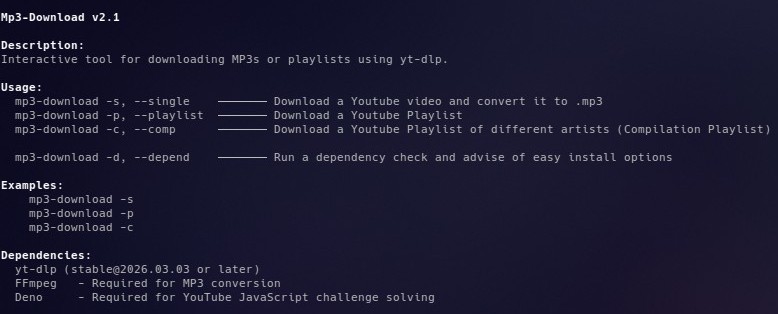
Description:
Interactive tool for downloading MP3s or playlists using yt-dlp.

Usage:
 mp3-download -s, –single    ──── Download a “Y T” video and convert it to .mp3
 mp3-download -p, –playlist  ──── Download a “Y T” Playlist
 mp3-download -c, –comp      ──── Download a “Y T” Playlist of different artists (Compilation Playlist)

 mp3-download -d, –depend    ──── Run a dependency check and advise of easy install options

Examples:
   mp3-download -s
   mp3-download -p
   mp3-download -c

Dependencies:
 yt-dlp (stable@2026.03.03 or later)
 FFmpeg   – Required for MP3 conversion
 Deno   – Required for YT’s JavaScript challenge solving

Download mp3-download.sh


Due to the nature of this particular CLI,
the code usually displayed here has been obfuscated.
However it can still be downloaded and reviewed above.

Facebook Text CLI

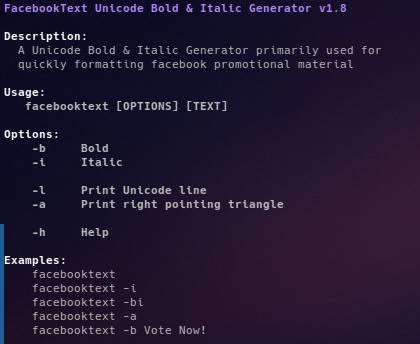
Description:
A Unicode Bold & Italic Generator primarily used for quickly formatting facebook promotional material.
The original concept has expanded into an ever-growing collection of useful Unicode Characters,
however retains the legacy name which reflect it’s origins.

Usage:
facebooktext [OPTIONS] [TEXT]

Commands:
   -b     Bold
   -i     Italic

   -l     Print Unicode line
   -a     Print right pointing triangle

   -u     Display full list of Unicode options

   -h     Help

Examples:
   facebooktext -i
   facebooktext -bi   
   facebooktext -b Vote Now!

Extended Unicode Options:
   -ar     Right Arrows
   -al     Left Arrows
   -ch     Check Marks
   -cr     Cross Marks
   -bu     Bullet Point
   -em     Empty Character

Examples:
   facebooktext -ch
   facebooktext -ch4
   facebooktext -ar2

Download facebooktext.sh

#!/bin/bash
#
#
set -euo pipefail

####################
# GLOBAL VARIABLES
####################
STYLE="DEFAULT"
VERSION="2.1.2"

####################
# COLOUR VARIABLES
####################

# Terminal Formatting
RESET="\033[0m"
F_BOLD="\033[1m"

# UI Colours
CLR_RED="\033[38;5;196m"  # Bright Red
CLR_GREEN="\033[38;5;46m" # Bright Lime Green

CLR_GOLD="\033[38;5;226m"           # Gold
CLR_PURPLE="\033[38;5;141m"         # Light Purple / Lavender
CLR_BLUE="\033[38;5;81m"            # Bright Sky Blue
CLR_DGREEN="\033[38;5;2m"           # Dark Forest Green
CLR_ORANGE="\033[38;5;208m"         # Faded Orange
CLR_PROMPT="${F_BOLD}\033[38;5;51m" # Aqua + Bold
CLR_TEXT="\033[38;5;250m"           # Light Grey
CLR_FRAME="\033[38;5;245m"          # Darker Grey

####################
# CHARACTER SETS
####################

NORMAL="ABCDEFGHIJKLMNOPQRSTUVWXYZabcdefghijklmnopqrstuvwxyz0123456789"

BOLD=(
    𝗔 𝗕 𝗖 𝗗 𝗘 𝗙 𝗚 𝗛 𝗜 𝗝 𝗞 𝗟 𝗠 𝗡 𝗢 𝗣 𝗤 𝗥 𝗦 𝗧 𝗨 𝗩 𝗪 𝗫 𝗬 𝗭
    𝗮 𝗯 𝗰 𝗱 𝗲 𝗳 𝗴 𝗵 𝗶 𝗷 𝗸 𝗹 𝗺 𝗻 𝗼 𝗽 𝗾 𝗿 𝘀 𝘁 𝘂 𝘃 𝘄 𝘅 𝘆 𝘇
    𝟬 𝟭 𝟮 𝟯 𝟰 𝟱 𝟲 𝟳 𝟴 𝟵
)

ITALIC=(
    𝘈 𝘉 𝘊 𝘋 𝘌 𝘍 𝘎 𝘏 𝘐 𝘑 𝘒 𝘓 𝘔 𝘕 𝘖 𝘗 𝘘 𝘙 𝘚 𝘛 𝘜 𝘝 𝘞 𝘟 𝘠 𝘡
    𝘢 𝘣 𝘤 𝘥 𝘦 𝘧 𝘨 𝘩 𝘪 𝘫 𝘬 𝘭 𝘮 𝘯 𝘰 𝘱 𝘲 𝘳 𝘴 𝘵 𝘶 𝘷 𝘸 𝘹 𝘺 𝘻
    𝟬 𝟭 𝟮 𝟯 𝟰 𝟱 𝟲 𝟳 𝟴 𝟵
)

BOLDITALIC=(
    𝘼 𝘽 𝘾 𝘿 𝙀 𝙁 𝙂 𝙃 𝙄 𝙅 𝙆 𝙇 𝙈 𝙉 𝙊 𝙋 𝙌 𝙍 𝙎 𝙏 𝙐 𝙑 𝙒 𝙓 𝙔 𝙕
    𝙖 𝙗 𝙘 𝙙 𝙚 𝙛 𝙜 𝙝 𝙞 𝙟 𝙠 𝙡 𝙢 𝙣 𝙤 𝙥 𝙦 𝙧 𝙨 𝙩 𝙪 𝙫 𝙬 𝙭 𝙮 𝙯
    𝟬 𝟭 𝟮 𝟯 𝟰 𝟱 𝟲 𝟳 𝟴 𝟵
)

RIGHT_ARROWS=(
    "▶"
    "►"
    "🢒"
    "⮞"
    "➤"
    "⮕"
    "🠲"
    "🡒"
    "⤅"
    "⤐"
    "⇀"
    "⇁"
    "↱"
    "↳"
    "➠"
    "⯮"
    "🢂"
)
LEFT_ARROWS=(
    "◀" # ▶
    "◄" # ►
    "🢐" # 🢒
    "⮜" # ⮞
    ""  # ➤
    "⬅" # ⮕
    "🠰" # 🠲
    "🡐" # 🡒
    "⬶" # ⤅
    "⬷" # ⤐
    "↼" # ⇀
    "↽" # ⇁
    "↰" # ↱
    "↲" # ↳
    ""  # ➠
    "⯬" # ⯮
    "🢀" # 🢂
)

CHECK_MARK=(
    "✓"
    "🗸"
    "✔"
    "✅"
    "🗹"
)
CROSS_MARK=(
    "🗙"
    "✗"
    "✘"
    "❎"
    "☒"
    "🗴"
)

BULLET_POINT=(
    "•"
)

EMPTY_CHAR=(
    "ㅤ"
)
####################
# FUNCTIONS
####################

usage() {
    echo -e "${F_BOLD}${CLR_PURPLE}FacebookText Unicode Bold & Italic Generator v${VERSION}${RESET}"
    echo
    echo -e "${F_BOLD}Description:${RESET}"
    echo -e "${CLR_TEXT}  A Unicode Bold & Italic Generator primarily used for"
    echo -e "  quickly formatting facebook promotional material"
    echo -e "  The original concept has expanded into an ever-growing collection of useful Unicode"
    echo -e "  characters, however retains the legacy name which reflect it’s origins.${RESET}"
    echo
    echo -e "${F_BOLD}Usage:${RESET}${CLR_TEXT}"
    echo -e "   facebooktext [OPTIONS] [TEXT]${RESET}"
    echo
    echo -e "${F_BOLD}Options:${RESET}${CLR_TEXT}"
    echo -e "    -b     Bold"
    echo -e "    -i     Italic"
    echo
    echo -e "    -l     Print Unicode line"
    echo -e "    -a     Print right pointing triangle"
    echo
    echo -e "    -u     Display full list of Unicode options"
    echo
    echo -e "    -h     Help${RESET}"
    echo
    echo -e "${F_BOLD}Examples:${RESET}${CLR_TEXT}"
    echo -e "    facebooktext"
    echo -e "    facebooktext -i"
    echo -e "    facebooktext -bi"
    echo -e "    facebooktext -aa"
    echo -e "    facebooktext -b "Vote Now!"${RESET}"
    echo
}

usage_unicode() {
echo
echo -e "${F_BOLD}Extended Unicode Options:${RESET}${CLR_TEXT}"
    echo -e "    -ar     Right Arrows"
    echo -e "    -al     Left Arrows"
    echo -e "    -ch     Check Marks"
    echo -e "    -cr     Cross Marks"
    echo -e "    -bu     Bullet Point"
    echo -e "    -em     Empty Character"
    echo
    echo -e "${F_BOLD}Examples:${RESET}${CLR_TEXT}"
    echo -e "    facebooktext -ch"
    echo -e "    facebooktext -ch4"
    echo -e "    facebooktext -ar2${RESET}"
    echo
}

separator() {
    printf '──────────────────────────────\n'
}

copy_clipboard() {
    if command -v xclip >/dev/null; then
        xclip -selection clipboard
    elif command -v wl-copy >/dev/null; then
        wl-copy
    else
        cat
    fi
}

convert() {
    local input="$1"
    local output=""
    local c pos
    local -n table="$2"

    local i
    for ((i = 0; i < ${#input}; i++)); do

        c="${input:i:1}"
        pos=$(expr index "$NORMAL" "$c") || pos=0

        if ((pos)); then
            output+="${table[pos - 1]}"
        else
            output+="$c"
        fi

    done

    printf '%s' "$output"
}

#####################
# SHOW/COPY SYMBOLS
#####################

copy_symbol() {
    local symbol="$1"

    printf '%s' "$symbol" | copy_clipboard >/dev/null

    echo
    echo -e " $symbol ${CLR_GREEN}Copied to clipboard${RESET}"
    echo
}

show_symbols() {
    local title="$1"
    local -n symbols="$2"

    echo
    echo "─────────────── "$title" ───────────────"

    for ((i = 0; i < ${#symbols[@]}; i++)); do
        printf '%2d  %s\n' "$((i + 1))" "${symbols[i]}"
    done

    echo
}

copy_symbol_from_array() {
    local -n symbols="$1"
    local index="$2"

    if ((index < 0 || index >= ${#symbols[@]})); then
        echo "Invalid symbol number: $((index + 1))" >&2
        exit 1
    fi

    copy_symbol "${symbols[index]}"
}
####################
# SYMBOL OPTIONS
####################

case "${1:-}" in

    # copy common arrow
    -a)
        copy_symbol_from_array RIGHT_ARROWS 0
        exit
        ;;
    # Right arrow catalogue
    -ar)
        show_symbols "Right Arrows" RIGHT_ARROWS
        exit
        ;;

    # Left arrows caralogue
    -al)
        show_symbols "Left Arrows" LEFT_ARROWS
        copy_symbol_from_array LEFT_ARROWS 0
        exit
        ;;
    # Checks
    -ch)
        show_symbols "Check Marks" CHECK_MARK
        exit
        ;;

    # Crosses
    -cr)
        show_symbols "Cross Marks" CROSS_MARK
        exit
        ;;
    # Bullet Point
    -bu)
        copy_symbol_from_array BULLET_POINT 0
        exit
        ;;
        # Bullet Point
    -em)
        copy_symbol_from_array EMPTY_CHAR 0
        exit
        ;;

    # Numbered symbols
    -ar[0-9]* | -al[0-9]* | -ch[0-9]* | -cr[0-9]*)
        number="${1:3}"

        if [[ ! "$number" =~ ^[0-9]+$ ]]; then
            echo "Invalid symbol number: $number" >&2
            exit 1
        fi

        case "${1:1:2}" in
            ar) symbols=RIGHT_ARROWS ;;
            al) symbols=LEFT_ARROWS ;;
            ch) symbols=CHECK_MARK ;;
            cr) symbols=CROSS_MARK ;;
            *)
                echo "Unknown symbol type: ${1:1:2}" >&2
                exit 1
                ;;
        esac
        copy_symbol_from_array "$symbols" "$((number - 1))"
        exit
        ;;
esac

####################
# OPTIONS
####################

while getopts ":bilauh" opt; do
    case "$opt" in
        b)
            case "$STYLE" in
                DEFAULT) STYLE="BOLD" ;;
                ITALIC) STYLE="BOLDITALIC" ;;
            esac
            ;;
        i)
            case "$STYLE" in
                DEFAULT) STYLE="ITALIC" ;;
                BOLD) STYLE="BOLDITALIC" ;;
            esac
            ;;
        l)
            echo
            echo -e " ${CLR_GREEN}Copied to clipboard${RESET}"
            echo
            separator
            separator | copy_clipboard >/dev/null
            echo
            echo
            exit
            ;;
        h)
            usage
            exit
            ;;
        u)
            usage_unicode
            exit
            ;;
    esac
done

shift $((OPTIND - 1))

case "$STYLE" in
    DEFAULT | BOLD)
        TABLE=BOLD
        ;;
    ITALIC)
        TABLE=ITALIC
        ;;
    BOLDITALIC)
        TABLE=BOLDITALIC
        ;;
esac
####################
# INPUT
####################

if (($#)); then
    OUTPUT=$(convert "$*" "$TABLE")

    printf '%s' "$OUTPUT" | copy_clipboard >/dev/null

    echo
    echo -e " ${OUTPUT}"
    echo
    separator
    echo -e "${CLR_GREEN} Copied to clipboard.${RESET}"
    separator
    echo
else
    echo
    echo -e "${F_BOLD}${CLR_BLUE}Enter desired text - then press ${CLR_GOLD}Ctrl+D${CLR_BLUE} when finished${RESET}"
    echo

    INPUT=$(cat)

    OUTPUT=""

    while IFS= read -r line || [[ -n $line ]]; do
        OUTPUT+="$(convert "$line" "$TABLE")"$'\n'
    done <<<"$INPUT"

    echo
    echo
    echo -e "───────────── ${CLR_ORANGE}Converted Text${RESET} ─────────────────"
    echo
    printf '%s' "$OUTPUT"

    printf '%s' "$OUTPUT" | copy_clipboard >/dev/null

    echo
    separator
    echo -e "${CLR_GREEN}Copied to clipboard.${RESET}"
    separator
    echo
fi

Whois CLI

Description:
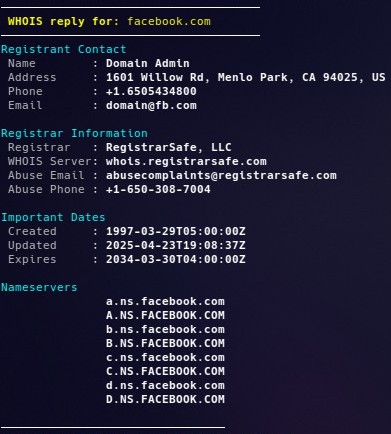
 A super simple CLI for pulling domain whois requests directly from whois.com to the terminal

Usage:
whois <url>

Commands:
 -v            Show version

Examples:
whois
whois facebook.com

Download whois.sh

#!/bin/bash
#
#

#######################
# GLOBAL VARIABLES
########################
VERSION="1.3"

####################
# COLOUR VARIABLES
####################
# Terminal Formatting
RESET="\033[0m"
BOLD="\033[1m"

# UI Colours
CLR_RED="\033[38;5;196m"     # Bright Red
CLR_GREEN="\033[38;5;46m"    # Bright Lime Green
CLR_GOLD="\033[38;5;226m"    # Gold
CLR_PURPLE="\033[38;5;141m"  # Light Purple / Lavender
CLR_BLUE="\033[38;5;4m"      # Bright Sky Blue
CLR_ORANGE="\033[38;5;208m"  # Orange
CLR_AQUA="\033[38;5;51m"     # Aqua
CLR_PINK="\033[38;5;199m"    # PINK
CLR_PBLUEE="\033[38;5;147m"  # Pale Blue
CLR_DGREEN="\033[38;5;2m"    # Dark Forest Green
CLR_PAQUA="\033[38;5;195m"   # Pale Aqua
CLR_GREY="\033[38;5;245m"    # Darker Grey
CLR_TEXT="\033[38;5;250m"    # Light Grey

####################
# VERSION
####################
if [[ "$1" == "-v" ]]; then
    echo -e " ${CLR_PURPLE}Simple Domain Lookup v${VERSION}${RESET}"
    exit 0
fi

####################
# GET URL
####################
if [[ -n "$1" ]]; then
    URL="$1"
else
    echo -e "${CLR_AQUA}Enter WHOIS Lookup URL:${RESET}"
    read URL
fi

####################
# DOWNLOAD WHOIS
####################
wget -q -nv -O output.html "https://who.is/whois/$URL"

####################
# CHECK FOR RESULTS
####################
if ! grep -q "Contact Information" output.html; then
    echo
    echo -e "${CLR_RED}Error: ${RESET}No Records Found"
    echo
    rm output.html
    exit 1
fi

echo "─────────────────────────────────────"
echo -e "${BOLD}${CLR_GOLD} WHOIS reply for:${RESET}${CLR_GOLD} $URL${RESET}"
echo "─────────────────────────────────────"

####################
# EXTRACT WHOIS DATA
####################

get_field() {
    grep -oP "$1: \K[^\\\\\"]+" output.html | head -1
}

echo -e "${CLR_AQUA}Registrant Contact${RESET}"
echo -e " ${CLR_TEXT}Name${RESET}        : ${BOLD}$(get_field "Registrant Name")${RESET}"
echo -e " ${CLR_TEXT}Address${RESET}     : ${BOLD}$(get_field "Registrant Street"), $(get_field "Registrant City"), $(get_field "Registrant State/Province") $(get_field "Registrant Postal Code"), $(get_field "Registrant Country")${RESET}"
echo -e " ${CLR_TEXT}Phone${RESET}       : ${BOLD}$(get_field "Registrant Phone")${RESET}"
echo -e " ${CLR_TEXT}Email${RESET}       : ${BOLD}$(get_field "Registrant Email")${RESET}"

echo
echo -e "${CLR_AQUA}Registrar Information${RESET}"
echo -e " ${CLR_TEXT}Registrar${RESET}   : ${BOLD}$(get_field "Registrar")${RESET}"
echo -e " ${CLR_TEXT}WHOIS Server${RESET}: ${BOLD}$(get_field "Registrar WHOIS Server")${RESET}"
echo -e " ${CLR_TEXT}Abuse Email${RESET} : ${BOLD}$(get_field "Registrar Abuse Contact Email")${RESET}"
echo -e " ${CLR_TEXT}Abuse Phone${RESET} : ${BOLD}$(get_field "Registrar Abuse Contact Phone")${RESET}"

echo
echo -e "${CLR_AQUA}Important Dates${RESET}"
echo -e " ${CLR_TEXT}Created${RESET}     : ${BOLD}$(get_field "Creation Date")${RESET}"
echo -e " ${CLR_TEXT}Updated${RESET}     : ${BOLD}$(get_field "Updated Date")${RESET}"
echo -e " ${CLR_TEXT}Expires${RESET}     : ${BOLD}$(get_field "Registrar Registration Expiration Date")${RESET}"

echo
echo -e "${CLR_AQUA}Nameservers${RESET}"
grep -oP 'Name Server: \K[^\\\\"]+' output.html |
sort -u |
while read -r nameserver; do
    echo -e " ${CLR_TEXT}              ${RESET}${BOLD}$nameserver${RESET}"
done

echo
echo "────────────────────────────────"

####################
# CLEANUP
####################
rm output.html

Ticket CLI

Description:
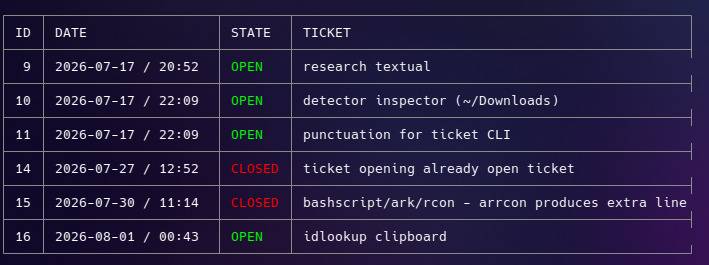
 A simple CLI for managing tickets and tasks in a terminal environment.
Uses a small .csv to store created tickets.

Usage:
 ticket <command> [arguments]

Commands:
 list,  -ls           List all tickets
 add,   -a  <text>    Add a new ticket
 del,   -d  <id>      Delete a ticket
 close, -c  <id>      Close a ticket
 open,  -o  <id>      Re-open a ticket
 help,  -h            Show this help

Examples:
 ticket add Buy milk
 ticket -a “Walk the dog”
 ticket close 3
 ticket del 7
 ticket list

Download ticket.sh

#!/bin/bash
#

#######################
# GLOBAL VARIABLES
########################
DATA_FILE="$HOME/.ticket.csv"
DELIM="%"
VERSION="1.6"

####################
# COLOUR VARIABLES
####################

# Terminal Formatting
RESET="\033[0m"
BOLD="\033[1m"

# UI Colours
CLR_ERROR="\033[38;5;196m"  # Bright Red
CLR_SUCCESS="\033[38;5;46m" # Bright Lime Green

CLR_INFO="\033[38;5;226m"         # Gold
CLR_ACTION="\033[38;5;141m"       # Light Purple / Lavender
CLR_LABEL="\033[38;5;81m"         # Bright Sky Blue
CLR_LABEL2="\033[38;5;2m"         # Dark Forest Green
CLR_PROMPT="${BOLD}\033[38;5;51m" # Aqua + Bold
CLR_TEXT="\033[38;5;254m"         # Light Grey
CLR_FRAME="\033[38;5;245m"        # Darker Grey

set -e

#######################
# Unicode box Chars
########################
H="─"
V="│"

TL="┌"
TR="┐"
BL="└"
BR="┘"

LT="├"
RT="┤"
TT="┬"
BT="┴"
CR="┼"

TH_FRAME="${CLR_FRAME}${TL}────${TT}─────────────────────${TT}────────${TT}───────────────────────────────────────────────────────────${TR}${RESET}"
MD_FRAME="${CLR_FRAME}${LT}────${CR}─────────────────────${CR}────────${CR}───────────────────────────────────────────────────────────${RT}${RESET}"
BH_FRAME="${CLR_FRAME}${BL}────${BT}─────────────────────${BT}────────${BT}───────────────────────────────────────────────────────────${BR}${RESET}"

ROW_PREFIX="${CLR_FRAME}${V}${RESET}"

############
# FUNCTIONS
#############

error() {
    echo
    echo -e "  ${CLR_ERROR}Error: ${RESET}$1"
    echo
}

ticket_action() {
    echo
    echo "────────────────────────"
    echo -e " ▶ ${1}Ticket (${RESET}${BOLD}${2}${RESET}${1}) ${3}${RESET}"
    echo "────────────────────────"
}

next_id() {

    if [[ ! -s "$DATA_FILE" ]]; then
        echo 1
        return
    fi

    awk -F'%' '
        $1 > max { max = $1 }
        END { print max + 1 }
    ' "$DATA_FILE"
}

cmd_list() {

    if [[ ! -s "$DATA_FILE" ]]; then
        touch "$DATA_FILE"
    fi

    local FMT="$ROW_PREFIX %2s $ROW_PREFIX %-19s $ROW_PREFIX %-6s $ROW_PREFIX %-47s $ROW_PREFIX\n"

    echo
    echo -e "${TH_FRAME}"

    printf "$FMT" "ID" "DATE" "STATE" "TICKET"
    printf "%b" "$RESET"
    echo -e "${MD_FRAME}"

    if [[ ! -s "$DATA_FILE" ]]; then
        echo " No current tickets"
        echo -e "${MD_FRAME}"
    fi

    #framing check
    first=1

    while IFS="$DELIM" read -r id status datetime ticket; do

        # Ifs to determine framing
        if ((!first)); then
            echo -e "${MD_FRAME}"
        fi
        first=0

        # Setup Ticket Contents
        printf "$ROW_PREFIX %2s $ROW_PREFIX %-19s $ROW_PREFIX " \
            "$id" "$datetime"

        #Ticket Colouring
        if [[ "$status" == "OPEN" ]]; then
            printf "%b%-6s%b" "$CLR_SUCCESS" "$status" "$RESET"
        else
            printf "%b%-6s%b" "$CLR_ERROR" "$status" "$RESET"
        fi

        # Ticket Description
        printf " $ROW_PREFIX %s\n" "$ticket"

    done <"$DATA_FILE"

    echo -e "${BH_FRAME}"
    echo

}

cmd_add() {
    id=$(next_id)
    status="OPEN"
    datetime="$(date '+%Y-%m-%d / %H:%M')"
    ticket="$*"

    printf '%s%s%s%s%s%s%s\n' \
        "$id" "$DELIM" \
        "$status" "$DELIM" \
        "$datetime" "$DELIM" \
        "$ticket" >>"$DATA_FILE"

    ticket_action ${CLR_SUCCESS} ${id} "Created"
}

cmd_delete() {
    local delete_id="$1"

    #
    # Ensure the ID is numerical & Exists
    #

    # If Blank
    if [[ -z "$delete_id" ]]; then
        error "No Ticket ID Specified"
        echo "  Usage: ticket -d <id>"
        echo
        return 1
    fi

    # IF input isn't a number
    if [[ ! $delete_id =~ ^[0-9]+$ ]]; then
        error "${delete_id} is not a numerical value"
        exit
    fi

    # If delete_id is 5, this searches specifically for "^5%"
    # to ensure the delete_id exists in $DATA_FILE
    if grep -q "^${delete_id}${DELIM}" "$DATA_FILE"; then

        #
        # Finish checks - continue Deleting
        #

        while IFS="$DELIM" read -r id status datetime ticket; do
            if [[ "$id" != "$delete_id" ]]; then
                printf '%s%%%s%%%s%%%s\n' \
                    "$id" "$status" "$datetime" "$ticket"
            fi
        done <"$DATA_FILE" >"$DATA_FILE.tmp"

        mv "$DATA_FILE.tmp" "$DATA_FILE"

        ticket_action ${CLR_ERROR} ${delete_id} "Deleted"

    else
        error "Ticket '$delete_id' does not exist."
    fi
}

cmd_open() {
    local open_id="$1"

    # If Blank
    if [[ -z "$open_id" ]]; then
        error "No Ticket ID Specified"
        echo "  Usage: ticket -o <id>"
        echo
        return 1
    fi

    # IF input isn't a number
    if [[ ! $open_id =~ ^[0-9]+$ ]]; then
        error "${open_id} is not a numerical value"
        return 1
    fi

    if grep -q "^${open_id}${DELIM}" "$DATA_FILE"; then

        # Create the tempfile
        >"$DATA_FILE.tmp"

        while IFS="$DELIM" read -r id status datetime ticket; do
            if [[ "$id" == "$open_id" ]]; then
                if [[ "$status" == "OPEN" ]]; then
                    ticket_action "$CLR_ERROR" "$open_id" "Already Open"
                    echo
                    exit 0
                else
                    status="OPEN"
                fi
            fi

            #Append data to the temp file
            printf '%s%%%s%%%s%%%s\n' \
                "$id" "$status" "$datetime" "$ticket" >>"$DATA_FILE.tmp"
        done <"$DATA_FILE"

        #overwrite our csv
        mv "$DATA_FILE.tmp" "$DATA_FILE"
        ticket_action "$CLR_SUCCESS" "$open_id" "Opened"
        echo
    else
        error "Ticket '$open_id' does not exist."
    fi
}

cmd_close() {
    local close_id="$1"

    # If Blank
    if [[ -z "$close_id" ]]; then
        error "No Ticket ID Specified"
        echo "  Usage: ticket -c <id>"
        echo
        return 1
    fi

    # IF input isn't a number
    if [[ ! $close_id =~ ^[0-9]+$ ]]; then
        error "${close_id} is not a numerical value"
        return 1
    fi

    if grep -q "^${close_id}${DELIM}" "$DATA_FILE"; then

        # Create the tempfile
        >"$DATA_FILE.tmp"

        while IFS="$DELIM" read -r id status datetime ticket; do
            if [[ "$id" == "$close_id" ]]; then
                if [[ "$status" == "CLOSED" ]]; then
                    ticket_action "$CLR_ERROR" "$close_id" "Already Closed"
                    echo
                    exit 0
                else
                    status="CLOSED"
                fi
            fi

            printf '%s%%%s%%%s%%%s\n' \
                "$id" "$status" "$datetime" "$ticket" >>"$DATA_FILE.tmp"
        done <"$DATA_FILE"

        mv "$DATA_FILE.tmp" "$DATA_FILE"
        ticket_action "$CLR_ERROR" "$close_id" "Closed"
        echo
    else
        error "Ticket '$close_id' does not exist."
    fi
}

usage() {
    echo -e "${BOLD}Odi's Ticket CLI v${VERSION}${RESET}"
    echo
    echo -e "${BOLD}Description:${RESET}"
    echo -e "${CLR_TEXT}  A simple CLI for managing tickets and tasks.${RESET}"
    echo
    echo -e "${BOLD}Usage:${RESET}"
    echo -e "  ${CLR_TEXT}ticket <command> [arguments]${RESET}"
    echo

    echo -e "${BOLD}Commands:${RESET}"
    echo -e "${CLR_TEXT}  list,  -ls           List all tickets"
    echo -e "  add,   -a  <text>    Add a new ticket"
    echo -e "  del,   -d  <id>      Delete a ticket"
    echo -e "  close, -c  <id>      Close a ticket"
    echo -e "  open,  -o  <id>      Re-open a ticket"
    echo -e "  help,  -h            Show this help${RESET}"
    echo

    echo -e "${BOLD}Examples:${RESET}"
    echo -e "${CLR_TEXT}  ticket add Buy milk"
    echo -e "  ticket -a \"Walk the dog\""
    echo -e "  ticket close 3"
    echo -e "  ticket del 7"
    echo -e "  ticket list${RESET}"
    echo
}

#############
# COMMANDS
##############

if [[ $# -eq 0 ]]; then
    usage
    exit 0
fi

case "${1:-}" in
    add | -a)
        shift
        cmd_add "$@"
        ;;

    delete | del | -d)
        shift
        cmd_delete "$1"
        ;;

    close | -c)
        shift
        cmd_close "$@"
        ;;

    open | -o)
        shift
        cmd_open "$@"
        ;;

    list | -ls)
        shift
        cmd_list "$@"
        ;;

    help | -h | --help)
        usage
        ;;

    *)
        echo "Unknown command."
        usage
        exit 1
        ;;
esac